
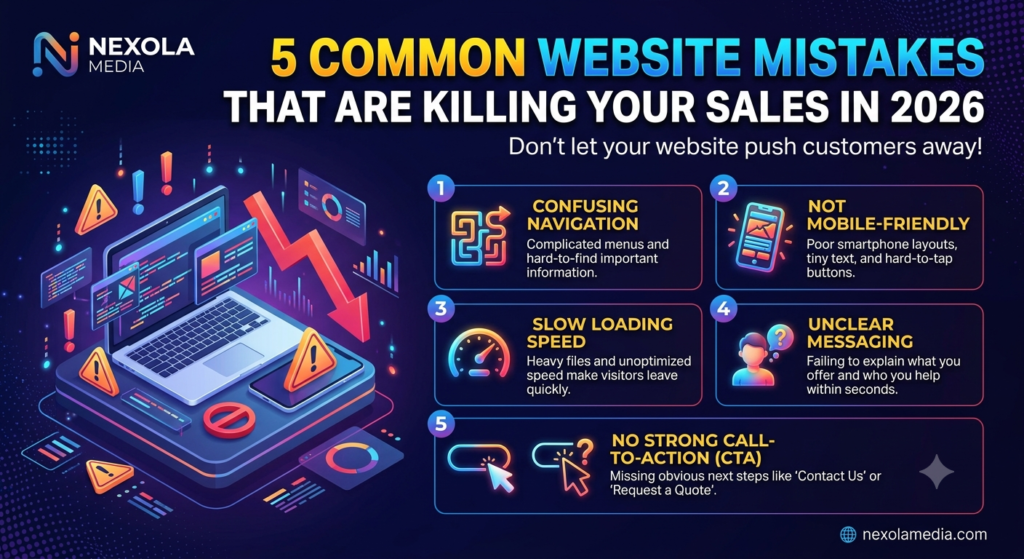
5 Common Website Mistakes That Are Killing Your Sales in 2026
In 2026, having a website is no longer enough for a business. Your website needs to do much more than simply display your company name, services, products, and contact information. It needs to attract the right audience, communicate your value clearly, build trust, provide an excellent user experience, and encourage visitors to take action.Website Optimization is essential for turning website visitors into customers.
Many businesses spend a significant amount of money on website design, SEO, Google Ads, social media marketing, and content creation. They may even receive hundreds or thousands of visitors every month. However, their sales and leads remain low.
Why does this happen?
In many cases, the problem is not the amount of traffic. The problem is the website itself.
A website can look attractive but still fail to generate customers. It can rank on Google but fail to convert visitors. It can receive traffic from Google Ads but waste advertising money because visitors leave without contacting the business.
This is why businesses need to understand the most common website mistakes that can reduce sales and conversions.
In this article, we will discuss 5 common website mistakes that are killing your sales in 2026, how these mistakes affect your business, and practical ways to fix them.Good Website Optimization improves both user experience and conversion rates.
Whether you are a small business owner, startup, local business, service provider, e-commerce company, or professional, these website optimization tips can help you create a better online presence.
Why Your Website Matters More Than Ever in 2026
Customers today often research a business online before making a decision.
A potential customer may discover your business through:
- Google Search
- Google Ads
- YouTube
- Blog articles
- Google Business Profile
- Online directories
- Recommendations
- Referral links
After discovering your business, the customer may visit your website to learn more.
They may want to know:
- What products or services do you offer?
- Are you a genuine business?
- Can you solve my problem?
- What makes you different?
- Do other customers trust you?
- How can I contact you?
- Can I request a quote?
- Can I book a consultation?
- Can I purchase online?
If your website cannot answer these questions quickly and clearly, the visitor may leave.
Your competitor may then get the customer instead.
This makes your website an important part of your overall digital marketing strategy.
A good website should work together with SEO, Google Ads, social media marketing, content marketing, and conversion optimization.
Mistake 1: Your Website Is Confusing and Difficult to Navigate
One of the most common website mistakes is creating a website that is difficult to navigate.One important part of Website Optimization is making your website easy to navigate.
Some businesses try to put everything on the website at once.
They add:
- Too many menu options
- Too many buttons
- Too many animations
- Long paragraphs
- Multiple popups
- Unnecessary pages
- Complicated dropdown menus
- Too many categories
The result is a website that looks busy and makes it difficult for visitors to find important information.
A professional website should make things easier, not harder.
Why Website Navigation Matters
Imagine a visitor searches Google for:
They click your website.
The visitor expects to immediately see information about SEO services.
Instead, they see a homepage with a vague headline, multiple unrelated sections, and no obvious way to find SEO information.
What will they probably do?
They may simply press the back button and visit another website.
That means you have lost a potential customer.
What Good Website Navigation Looks Like
A simple business website navigation could include:
Home | About Us | Services | Blog | Contact
For a digital marketing business, the Services page can include:
- SEO Services
- Google Ads
- Social Media Marketing
- Content Marketing
- Website Design
- Canva & Graphic Design
This structure allows visitors to understand the website quickly.
Common Navigation Problems
Check whether your website has any of these problems:
- Important pages are hidden
- Contact information is difficult to find
- The menu is too complicated
- Links are broken
- The mobile menu does not work
- Buttons are difficult to identify
- Visitors need too many clicks to reach important information
- Different pages have inconsistent navigation
These issues can negatively affect the user experience.
How to Fix Website Navigation
Keep the navigation simple.
Your most important pages should be accessible from the main menu.
Use clear names.
For example:
Instead of:
Our Solutions
you can use:
Services
Instead of:
Let’s Connect With Us
you can use:
Contact
Clear navigation helps visitors understand where they are and where they should go next.
You should also make your primary call-to-action easy to find.
Examples include:
Get a Free Consultation
Request a Quote
Contact Us
Book a Call
Get Started
The exact CTA should depend on your business goal.
Mistake 2: Your Website Is Not Mobile-Friendly
Another major website mistake is ignoring mobile users.
People increasingly use smartphones to search for businesses, compare products, read reviews, visit websites, and contact companies.
If your website works perfectly on a desktop but looks terrible on a smartphone, you may be losing potential customers.
A modern website should use responsive web design so that the layout automatically adjusts to different screen sizes.
Website Optimization also helps businesses improve website speed and mobile performance.
It should work properly on:
- Smartphones
- Tablets
- Laptops
- Desktop computers
What Happens When Your Website Is Not Mobile-Friendly?
A mobile visitor may experience:
- Tiny text
- Images that don’t fit the screen
- Buttons that are too small
- Horizontal scrolling
- Broken layouts
- Slow loading
- Difficult forms
- Menus that don’t work
- Popups covering important information
These problems create frustration.
A frustrated visitor is less likely to become a customer.
Mobile Experience Can Affect Conversions
Suppose your website receives 2,000 visitors every month.
If a large portion of those visitors are using smartphones and your website is difficult to use, you may be losing many potential leads.
Effective Website Optimization focuses on both search engines and real users.
You may not even realize that the website is the problem.
This is why mobile-friendly website design should be considered a basic requirement in 2026.
How to Make Your Website Mobile-Friendly
Check your website on different devices.
Ask:
Is the text readable?
Visitors should not have to zoom in to read your content.
Are buttons easy to tap?
Buttons should have enough space around them.
Does the menu work?
The mobile navigation should be simple.
Do images fit properly?
Images should not extend beyond the screen.
Are forms easy to complete?
Visitors should be able to fill out forms without frustration.
Is important information visible?
Phone numbers, CTAs, services, and important information should be easy to find.
A professional website design company in Noida can help businesses create responsive and mobile-friendly websites that provide a better experience across devices.
Mistake 3: Your Website Loads Too Slowly
Website speed is another common problem that can hurt sales.
People expect websites to load quickly.
If a visitor clicks your website and has to wait for a long time, they may leave before seeing your content.
This becomes even more important when you are spending money on advertising.
Imagine that you run Google Ads.
You spend money to bring potential customers to your website.
A person clicks your advertisement.
But the landing page takes too long to load.
The visitor leaves.
You have paid for the click but did not receive a lead or sale.
Regular Website Optimization can help reduce bounce rates and increase customer engagement.
Why Websites Become Slow
There are many possible reasons.
Common causes include:
- Large image files
- Unoptimized videos
- Too many plugins
- Poor hosting
- Excessive JavaScript
- Too many animations
- Unnecessary tracking scripts
- Poorly optimized themes
- Uncompressed files
- Too many popups
- Heavy third-party tools
Large Images Can Affect Website Speed
High-quality images are useful for branding and design, but unnecessarily large files can make pages heavy.
For small businesses, Website Optimization can make a website more effective at generating leads and sales.
For example, a business may upload a smartphone photograph that is several megabytes in size even though the website only needs a much smaller image.
Instead, images should be resized and compressed before or during upload.
Videos Need Optimization Too
Background videos can create an impressive visual experience.
However, large video files can increase page weight and slow down loading.
If your website uses video backgrounds, animations, or interactive elements, make sure performance is still a priority.
Your website should look professional without sacrificing usability.
How to Improve Website Speed
Start by reviewing:
- Image sizes
- Video files
- Plugins
- Hosting
- JavaScript
- CSS
- Third-party scripts
- Unnecessary animations
You can also use website performance testing tools to identify technical problems.
The goal is simple:
Make your website fast, useful, and easy to use.
Mistake 4: Your Website Does Not Clearly Explain What You Offer
This is one of the biggest mistakes businesses make.
Many business owners know their products or services so well that they assume customers will understand them automatically.
A successful Website Optimization strategy should be reviewed and improved regularly.
But visitors don’t have the same knowledge.
When someone opens your website, they should be able to understand what your business does within a few seconds.
Your homepage should communicate:
What you do + Who you help + What benefit you provide + What action the visitor should take.
Avoid Weak Headlines
A headline such as:
Welcome to Our Website
does not tell the visitor much.
Another example:
We Provide Innovative Solutions
is also too generic.
Instead, your headline should communicate a specific benefit.
For example:
Digital Marketing Services That Help Businesses Generate More Leads and Grow Online
This immediately tells the visitor what the company does.
Explain Your Services Clearly
Don’t assume customers understand industry terminology.
If you provide SEO services, explain what SEO means and how it helps.
If you provide Google Ads management, explain that you help businesses reach potential customers through paid search advertising.
If you provide website design, explain how a professional website can improve online credibility and generate leads.
Clear communication builds confidence.
Focus on Benefits
Features are useful, but benefits are often more persuasive.
For example:
Feature: Responsive website design.
Benefit: Your website works smoothly on smartphones, tablets, and desktops.
Another example:
Feature: SEO optimization.
Benefit: Your website can become more visible for relevant search queries and attract potential customers.
Visitors want to understand how your service can help them.
Mistake 5: Your Website Has No Strong Call-to-Action
You can have a beautiful website.
You can have excellent content.
You can have strong SEO.
You can have hundreds of visitors.
But if visitors don’t know what to do next, you may still lose customers.
This is why every business website needs clear calls-to-action (CTAs).
A CTA tells visitors what action they should take.
Examples include:
- Get a Free Consultation
- Contact Us
- Request a Quote
- Book a Call
- Start Your Project
- Get Started
- Talk to an Expert
- Request a Free Audit
Why CTAs Are Important
Think about the customer journey.
A visitor arrives on your homepage.
They read your headline.
They learn about your services.
They look at your portfolio.
They read testimonials.
Then they are interested.
What happens next?
If there is no obvious next step, they may simply close the website.
A strong CTA provides direction.
Don’t Use Too Many CTAs
More buttons don’t necessarily mean more conversions.
If your page contains:
- Buy Now
- Call Now
- Book Now
- Download
- Subscribe
- Contact
- Learn More
- Get Started
all at the same time, visitors may become confused.
Choose one primary action based on the purpose of the page.
For a service page:
Request a Free Consultation
For an e-commerce page:
Buy Now
For a contact page:
Send Message
Place CTAs Strategically
You can place CTAs:
- In the hero section
- After your main benefits
- After service descriptions
- Near testimonials
- At the end of the page
- Inside relevant sections
The CTA should feel like a natural next step.
Bonus Mistake: Ignoring Website SEO
There is another major problem worth discussing.
Some businesses spend a lot of money building a website but do very little SEO.
A website does not automatically rank on Google just because it looks professional.
Search engines need to understand your pages, content, topics, structure, and relevance.
This is where Search Engine Optimization (SEO) becomes important.
What Is SEO?
SEO is the process of improving your website and online presence so that search engines can better understand your content and users can discover your business through relevant searches.
For example, a business serving Noida may target keywords such as:
- digital marketing agency in Noida
- SEO company in Noida
- website design company in Noida
- Google Ads agency in Noida
- social media marketing agency in Noida
These keywords should be used naturally in relevant pages.
Important On-Page SEO Elements
A website should have:
- Relevant page titles
- Meta descriptions
- Proper heading structure
- H1, H2, and H3 headings
- Relevant keywords
- Internal links
- Optimized images
- Descriptive URLs
- Useful content
- Mobile-friendly design
- Good website performance
However, keyword stuffing should be avoided.
You should not repeat the same keyword in every sentence.
Write useful content first and use keywords naturally.
Poor Website Content Can Also Reduce Sales
Website design is only one part of the equation.
Your content matters too.
A website may look professional, but if the content is confusing, outdated, or full of unnecessary jargon, visitors may not trust the business.
Your content should be:
- Clear
- Useful
- Easy to understand
- Relevant
- Customer-focused
- Accurate
- Easy to scan
Use short paragraphs, headings, bullet points, and clear explanations.
Don’t make every page a wall of text.
Visitors often scan a website before deciding whether to read it carefully.
Missing Trust Signals Can Cost You Customers
Imagine two companies offer the same service.
Company A has:
- Testimonials
- Portfolio
- Case studies
- Clear contact information
- Professional website
- About Us page
- Active online presence
Company B has only:
- A basic homepage
- No testimonials
- No portfolio
- No clear information
- No visible contact details
Which company would you trust more?
Most customers would probably feel more comfortable with Company A.
This is why trust signals matter.
Examples of Trust Signals
You can use:
Customer Testimonials
Show genuine feedback from customers.
Portfolio
Show examples of previous work.
Case Studies
Explain how you solved customer problems.
Reviews
Where appropriate, display genuine reviews.
About Us Page
Explain who you are and what your business does.
Contact Information
Make it easy to reach you.
Professional Branding
Use consistent fonts, colors, graphics, and imagery.
Never use fake testimonials or misleading claims.
Trust should be earned rather than manufactured.
Your Contact Form Could Be Losing Leads
Contact forms are important for service businesses.
However, many businesses make forms unnecessarily complicated.
Imagine a customer wants to request a consultation.
Your form asks for:
- Full name
- Phone
- Company
- Address
- City
- Website
- Budget
- Industry
- Company size
- Detailed requirements
- Multiple additional questions
The visitor may decide it is too much work.
A simple form can often be better.
For example:
Name
Email / Phone
What service do you need?
Message
Submit
You can collect additional information later if necessary.
The goal is to reduce friction.
Landing Page Mistakes Can Waste Google Ads Budget
A landing page is particularly important when you run paid advertising.
If your Google Ads campaign targets:
but the advertisement sends users to a generic homepage that talks about ten unrelated services, the experience may not be ideal.
A better approach can be a dedicated landing page focused specifically on Google Ads services.
The page can include:
- Relevant headline
- Service explanation
- Benefits
- Process
- Testimonials
- Case studies
- FAQs
- Strong CTA
- Contact form
This creates a more relevant experience.
Your advertisement makes a promise.
The landing page should continue that conversation.
Website Design Should Support Your Digital Marketing Strategy
Your website should not exist separately from your marketing.
Think of your digital marketing system like this:
SEO → Website → Content → Lead → Customer
Or:
Google Ads → Landing Page → CTA → Lead
Or:
Social Media → Website → Trust → Inquiry
Every part should support the next step.
If your social media looks professional but your website looks outdated, customers may lose confidence.
If your Google Ads campaign is strong but your landing page is poor, your advertising performance may suffer.
If your SEO brings traffic but your website does not convert, you may generate visitors without generating enough business.
How to Create a Conversion-Friendly Website in 2026
A conversion-friendly website focuses on both design and business objectives.
Here is a useful structure.
1. Create a Strong Hero Section
The hero section is the first major section visitors see.
It should contain:
- Clear headline
- Supporting description
- Primary CTA
- Relevant visual
Don’t make the visitor guess what you do.
2. Explain Your Services
Create a clear Services section.
Use short descriptions and direct links to detailed service pages.
3. Explain Your Benefits
Tell customers why your service matters.
Focus on outcomes.
4. Add Social Proof
Use:
- Testimonials
- Reviews
- Portfolio
- Case studies
- Client feedback
where available.
5. Explain Your Process
A simple process can reduce uncertainty.
For example:
Strategy → Create → Launch → Analyze → Improve
6. Add FAQs
Answer common questions before the customer has to ask.
FAQs can help reduce objections.
7. End With a Strong CTA
Don’t let visitors reach the bottom of the page and wonder what to do next.
Give them a clear action.
Why Professional Website Design Matters for Small Businesses
Small businesses often compete against larger companies with bigger marketing budgets.
A professional website can help a smaller company present itself more confidently online.
When customers compare businesses, they often consider:
- Website quality
- Reviews
- Services
- Pricing
- Experience
- Communication
- Online presence
A modern website cannot guarantee sales, but a poor website can certainly create unnecessary obstacles.
This is why investing in professional website design services can be valuable for businesses that depend on online leads and customers.
How Website Optimization Can Improve Business Growth
Website optimization is not only about changing colors or fonts.
It involves improving the entire customer experience.
You may need to improve:
- Website speed
- Navigation
- Content
- SEO
- Mobile experience
- CTAs
- Forms
- Landing pages
- Trust signals
- Internal links
- Page structure
Small improvements can make the website easier to use.
For example, moving a contact button to a more visible location may make it easier for visitors to contact you.
Simplifying a form may reduce abandonment.
Improving page speed may create a smoother experience.
Clarifying your headline may help visitors understand your business faster.
Don’t Focus Only on Website Traffic
Traffic is important, but traffic alone does not pay the bills.
Suppose one website receives:
10,000 visitors + 20 leads
and another receives:
3,000 visitors + 100 leads
The second website may be much more effective at generating business.
This is why you should consider metrics such as:
- Leads
- Conversion rate
- Contact form submissions
- Phone calls
- Bookings
- Sales
- Revenue
- Cost per lead
Instead of asking only:
“How many people visited my website?”
also ask:
“How many visitors became customers?”
Website Conversion Rate Matters
Your conversion rate measures how many visitors complete a desired action.
For example, if 1,000 people visit your website and 30 submit a contact form, your conversion rate for that action is 3%.
The goal is not always to dramatically increase traffic.
Sometimes, improving the experience for existing traffic can create better results.
You can test:
- Headlines
- CTA wording
- Button placement
- Forms
- Images
- Page structure
- Testimonials
- Service descriptions
This process is known as conversion rate optimization.
Website Mistakes Checklist for 2026
Before launching or redesigning your website, check the following.
Design Checklist
- Is the design professional?
- Are colors consistent?
- Are fonts easy to read?
- Is there enough white space?
- Are images relevant?
- Does the design match your brand?
Navigation Checklist
- Is the main menu simple?
- Are important pages easy to find?
- Do all links work?
- Does the mobile menu work?
- Can visitors easily reach the Contact page?
Mobile Checklist
- Is the website responsive?
- Is text readable?
- Are buttons easy to tap?
- Do images fit the screen?
- Are forms easy to complete?
Speed Checklist
- Are images compressed?
- Are videos optimized?
- Are unnecessary plugins removed?
- Is the hosting reliable?
- Are unnecessary scripts removed?
SEO Checklist
- Does each page have a relevant title?
- Is there a proper H1?
- Are H2 and H3 headings structured correctly?
- Are keywords used naturally?
- Are images optimized?
- Are internal links included?
- Are URLs descriptive?
Conversion Checklist
- Is there a clear CTA?
- Is the contact information visible?
- Is the contact form simple?
- Are trust signals included?
- Are testimonials genuine?
- Is the next step obvious?
How Nexola Media Can Help
A website should be more than an online presence.
It should support your business goals.
At Nexola Media, businesses can build a stronger digital presence through services such as:
- Search Engine Optimization
- Google Ads / PPC Advertising
- Social Media Marketing
- Content Marketing
- Website Design
- Creative & Canva Design
The objective is to create a connected digital marketing strategy where your website, SEO, advertising, social media, and content support one another.
For businesses targeting customers in Noida and other competitive markets, having a professional online presence can help create a stronger foundation for long-term digital growth.
Whether you need a new website, website improvements, SEO, Google Ads management, or social media marketing, the first step is understanding what is preventing your current website from performing better.
Final Thoughts
Your website is one of the most important parts of your digital marketing strategy in 2026.
It doesn’t matter how much money you spend on advertising or how much time you spend creating social media content if your website makes visitors leave.
The five major mistakes discussed in this article are:
- Confusing and difficult navigation
- Poor mobile experience
- Slow website speed
- Unclear messaging
- Weak or missing calls-to-action
In addition, businesses should pay attention to SEO, content quality, trust signals, landing pages, contact forms, and conversion optimization.
The good news is that these problems can be fixed.
Start by looking at your website from the customer’s perspective.
Ask yourself:
Can a new visitor understand my business within a few seconds?
Can they easily find my services?
Does the website work properly on mobile?
Does it load quickly?
Do they know what to do next?
Is there enough information to build trust?
If the answer to several of these questions is no, your website may be costing you leads and sales.
A successful website should not only look good.
It should be fast, mobile-friendly, easy to navigate, SEO-friendly, trustworthy, and focused on conversions.
If you want to improve your website and build a stronger digital presence, Nexola Media can help you develop a strategy around website design, SEO, Google Ads, social media marketing, and content marketing.
Your website should not just attract visitors. It should help turn those visitors into customers.
Frequently Asked Questions
What are the most common website mistakes?
Some of the most common mistakes include confusing navigation, poor mobile design, slow loading speed, unclear messaging, weak CTAs, poor SEO, complicated forms, and lack of trust signals.
Can a bad website reduce sales?
Yes. A website that is slow, confusing, outdated, or difficult to use can cause visitors to leave before contacting the business or making a purchase.
How can I improve my website conversion rate?
Start by improving your headline, navigation, mobile experience, website speed, trust signals, service descriptions, CTAs, and contact forms. Track your results and continue improving the pages that generate the most traffic.
Why is mobile-friendly website design important?
Customers frequently use smartphones to search for businesses and services. A mobile-friendly website makes it easier for them to read information, navigate pages, submit forms, and contact your business.
Does website speed affect sales?
Yes. Slow websites can create a poor user experience. Visitors may leave before the page finishes loading, especially when they are using mobile devices.
What is a conversion-friendly website?
A conversion-friendly website is designed to guide visitors toward a specific business goal, such as submitting a form, calling a business, booking an appointment, requesting a quote, or purchasing a product.
Why is SEO important for a business website?
SEO can help your website become more visible for relevant searches. This can help businesses attract potential customers who are already searching for related products or services.
Should small businesses invest in professional website design?
If your website is an important source of leads or sales, professional website design can be a valuable investment. A professional website can improve usability, credibility, mobile experience, and conversion opportunities.
How often should I update my website?
There is no single schedule for every business. However, you should regularly review your content, SEO, security, mobile experience, design, speed, and conversion performance.A successful website needs continuous Website Optimization to stay competitive and generate more sales. From improving loading speed and mobile usability to creating clear navigation and strong calls to action, Website Optimization can make every part of a website more effective. Businesses that invest in Website Optimization can provide a better user experience while also improving their chances of getting more leads and conversions. Regular Website Optimization ensures that your website continues to meet changing customer expectations and business goals.
Can Google Ads work with a poorly designed website?
Google Ads can generate traffic, but a poor landing page may reduce the number of visitors who become leads or customers. Your advertisements and landing pages should work together.
Website Optimization is an important part of improving your website’s performance, user experience, and sales. Effective Website Optimization includes improving page speed, mobile responsiveness, navigation, content, and overall website design so visitors can easily find the information they need. Good Website Optimization can also help reduce bounce rates, improve conversions, and turn more visitors into customers. Businesses should regularly review their Website Optimization strategy to identify problems and make improvements that support long-term growth.Effective Website Optimization is not only about fixing technical issues but also about making the website more useful for visitors. A complete Website Optimization strategy should improve page speed, mobile experience, navigation, content quality, and conversion opportunities. ing, or difficult to use.
Effective Website Optimization is not only about fixing technical issues. It also focuses on making the website useful and easy to navigate for visitors.
A good Website Optimization strategy should improve page speed, mobile experience, navigation, content quality, and conversion opportunities.
Regular Website Optimization can create a smoother customer journey and increase the chances of turning website visitors into paying customers.