

1: What Are Meta Ads?
Meta Ads are paid advertisements that businesses use to promote their products, services, websites, or content on platforms such as Facebook and Instagram.
Meta Ads help businesses reach specific audiences based on factors such as location, age, interests, and online behavior.
2: Open Meta Ads Manager
To create an advertisement, start by opening Meta Ads Manager. Connect your Facebook Page and Instagram account to your advertising account.
3: Choose Your Campaign Objective
Select the main goal of your campaign. Common objectives include:
- Awareness – Increase brand awareness
- Traffic – Send people to your website
- Engagement – Get more likes, comments, shares, or interactions
- Leads – Collect customer information
- Sales – Generate purchases or conversions
Choose the objective that matches your business goal.
4: Define Your Target Audience
Targeting the right audience is one of the most important parts of Meta advertising.
You can define your audience using: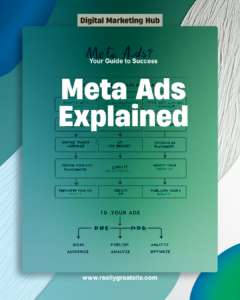
- Location
- Age
- Gender
- Interests
- Behaviors
- Custom audiences
For example, a women’s fashion brand can target people interested in fashion, clothing, beauty, and online shopping.
5: Set Your Budget
Next, decide how much you want to spend on your campaign.
You can usually choose between:
- Daily Budget – Amount spent per day
- Lifetime Budget – Amount spent over the entire campaign period
For beginners, starting with a small test budget can help you understand which audience and creative perform best.
6: Choose Ad Placements
Placements determine where your advertisement will appear.
Your ads may appear on:
- Facebook Feed
- Instagram Feed
- Instagram Stories
- Instagram Reels
- Facebook Stories
- Other available Meta placements
You can choose placements manually or use Advantage+ placements.
7: Create Your Ad
Now create the actual advertisement.
Your ad can include:
- Image or video
- Primary text
- Headline
- Website link
- Call-to-Action (CTA)
Common CTA buttons include:
Learn More | Shop Now | Contact Us | Sign Up
Make sure your design is clear, attractive, and easy to understand on a mobile screen.
8: Preview Your Ad
Before publishing, carefully check your advertisement.
Make sure:
- The text has no spelling mistakes.
- The image or video is high quality.
- The CTA is correct.
- The website link works.
- The ad looks good on both Facebook and Instagram
9: Publish Your Ad
Once everything looks correct, click Publish.
Meta will review your advertisement according to its advertising policies. If approved, your ad can start running.
10: Monitor Your Results
After your campaign starts, regularly check its performance in Ads Manager.
Important metrics include:
- Reach – Number of people who saw your ad
- Impressions – Number of times your ad was displayed
- Clicks – Number of clicks on your ad
- CTR – Click-through rate
- CPC – Cost per click
- Leads – Number of potential customers generated
- Conversions – Desired actions completed
- Cost per Result – Average cost for each result
-
Conclusion
-
Meta Ads can be a powerful way to reach potential customers on Facebook and Instagram. A successful campaign starts with a clear goal, the right target audience, an attractive creative, a suitable budget, and regular performance analysis.
Simple Meta Ads Formula:
Goal → Audience → Budget → Creative → Placement → Publish → Analyze → Optimize